Choosing the right string handling class in Java can make or break your application’s performance. Use the wrong one, and you’ll watch your memory consumption skyrocket while your execution speed crawls to a halt.
Here’s the truth: String, StringBuilder, and StringBuffer are fundamentally different tools designed for different scenarios. Understanding when to use each isn’t just academic knowledge—it’s a practical skill that separates junior developers from seasoned professionals.
This guide covers everything you need to know about string manipulation in Java. By the end, you’ll know exactly which class to reach for in every situation.
What Are String, StringBuilder, and StringBuffer?
Let’s start with the fundamentals.
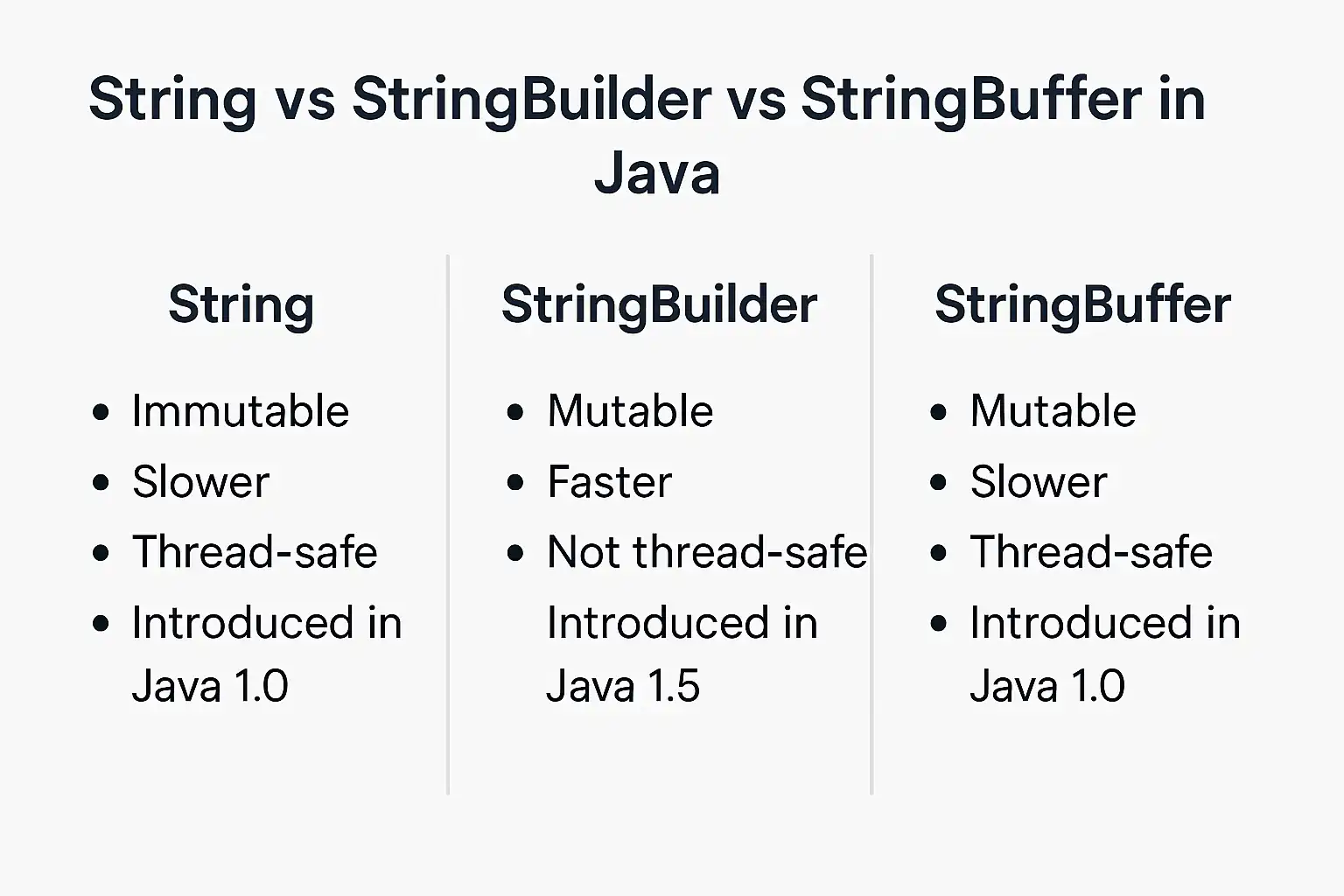
String is an immutable sequence of characters. Once created, its value cannot be changed. Every modification creates a new String object in memory.
StringBuilder is a mutable sequence of characters designed for single-threaded environments. It allows you to modify the character sequence without creating new objects.
StringBuffer is also a mutable sequence of characters, but with synchronized methods that make it thread-safe for multi-threaded environments.
Here’s the critical distinction: immutability versus mutability, and thread-safety versus performance.
Why This Matters Right Now
Java applications process strings constantly—from parsing user input to generating dynamic content. Poor string handling creates unnecessary objects, triggers excessive garbage collection, and degrades application performance.
With modern applications handling millions of requests, the difference between String concatenation and StringBuilder can mean the difference between smooth operation and system crashes.
The Core Differences: String vs StringBuilder vs StringBuffer
Let’s break down the fundamental characteristics that set these classes apart.
Mutability: The Game Changer
String objects are immutable. When you write:
String str = "Hello";

str = str + " World";
You’re not modifying the original String. You’re creating an entirely new String object. The original “Hello” remains in memory until garbage collected.
StringBuilder and StringBuffer are mutable. They maintain an internal character array that can be modified:
StringBuilder sb = new StringBuilder("Hello");

sb.append(" World"); // Modifies the existing object
This fundamental difference drives every other consideration.
Thread Safety: The Trade-Off
StringBuffer is synchronized. Every method is thread-safe, meaning multiple threads can safely access the same StringBuffer instance without data corruption.
StringBuilder is not synchronized. It offers no thread safety guarantees but runs significantly faster in single-threaded contexts.
String is inherently thread-safe because it’s immutable. Multiple threads can share String references without any risk.
Performance Characteristics
Here’s where the rubber meets the road:
String concatenation in loops creates a new object for each operation. Concatenating 1,000 strings creates 1,000 intermediate objects—a performance nightmare.
StringBuilder performs the same operation with minimal object creation, typically 10-100x faster for repeated concatenations.
StringBuffer adds synchronization overhead, making it approximately 20-30% slower than StringBuilder in single-threaded scenarios.
Memory Footprint
String concatenation generates substantial garbage. Each intermediate String occupies heap space until garbage collected.
StringBuilder and StringBuffer maintain a resizable internal buffer. They allocate more capacity than needed (typically doubling when full) to minimize array copying.
The default initial capacity is 16 characters. If you know your final size, pre-allocating capacity eliminates resizing overhead:
StringBuilder sb = new StringBuilder(100); // Pre-allocate for 100 characters
When to Use String
Despite its immutability drawbacks, String is the right choice in many scenarios.
Small, Fixed Text Operations
For simple, one-time concatenations, String is perfectly fine:
String greeting = "Hello, " + userName + "!";
The Java compiler optimizes simple concatenations automatically. Don’t overthink it.
String Literals and Constants
When working with fixed text, String is ideal:
public static final String ERROR_MESSAGE = "Invalid input";
String literals are stored in the String pool, enabling memory reuse across your application.
Method Parameters and Return Values
String is the standard choice for API contracts:
public String formatUserName(String firstName, String lastName) {

    return firstName + " " + lastName;

}
The immutability guarantees that callers can’t modify your internal state—a crucial security and stability feature.
HashMap and HashSet Keys
String’s immutability makes it perfect for hash-based collections:
Map<String, User> userCache = new HashMap<>();
Mutable keys would break hash-based collections if their hash codes changed after insertion.
When String Is Wrong
Avoid String for:
- Loop-based concatenation: Creates excessive objects
- Building large text blocks: Wastes memory and CPU
- Frequent modifications: Defeats the purpose of immutability
When to Use StringBuilder
StringBuilder is your go-to for dynamic string construction in single-threaded contexts.
Loop-Based String Construction
This is StringBuilder’s killer use case:
StringBuilder result = new StringBuilder();

for (int i = 0; i < 1000; i++) {

    result.append("Item ").append(i).append("\n");

}

String output = result.toString();
This pattern is dramatically faster than String concatenation in loops.
Building Complex Strings
When assembling strings from multiple parts:
StringBuilder html = new StringBuilder();

html.append("<html>")

    .append("<body>")

    .append("<h1>").append(title).append("</h1>")

    .append("<p>").append(content).append("</p>")

    .append("</body>")

    .append("</html>");
The method chaining pattern makes code readable while maintaining performance.
String Manipulation Operations
StringBuilder provides efficient methods for common operations:
StringBuilder sb = new StringBuilder("Hello World");

sb.reverse(); // "dlroW olleH"

sb.delete(5, 11); // "dlroW"

sb.insert(0, "Say "); // "Say dlroW"
These operations modify the existing buffer without creating new objects.
Performance-Critical Code
In tight loops or frequently-called methods, StringBuilder prevents garbage collection pressure:
public String generateReport(List<Record> records) {

    StringBuilder report = new StringBuilder(records.size() * 50);

    for (Record record : records) {

        report.append(record.getId())

              .append(",")

              .append(record.getName())

              .append("\n");

    }

    return report.toString();

}
Notice the capacity pre-allocation—this eliminates resizing overhead.
When to Use StringBuffer
StringBuffer serves a specific niche: thread-safe string manipulation.
Multi-Threaded String Building
When multiple threads contribute to a shared string:
StringBuffer sharedBuffer = new StringBuffer();

// Thread 1

new Thread(() -> {

    for (int i = 0; i < 100; i++) {

        sharedBuffer.append("A");

    }

}).start();

// Thread 2

new Thread(() -> {

    for (int i = 0; i < 100; i++) {

        sharedBuffer.append("B");

    }

}).start();
StringBuffer ensures thread-safe access without explicit synchronization.
Legacy Code Compatibility
Older Java codebases often use StringBuffer. When maintaining such code, consistency matters:
// Existing codebase uses StringBuffer

public void appendToLog(StringBuffer logBuffer, String message) {

    logBuffer.append(message).append("\n");

}
When StringBuffer Is Wrong
Here’s the reality: you rarely need StringBuffer in modern Java.
Most string building happens in local variables within a single thread. StringBuilder is almost always the better choice.
If you need thread safety, consider these alternatives:
- ThreadLocal: Gives each thread its own StringBuilder
- Immutable concatenation: Build strings locally, then combine
- Concurrent data structures: Use proper concurrent collections instead
StringBuffer’s synchronized methods add overhead without benefit in single-threaded scenarios.
String vs StringBuilder: Direct Comparison
Let’s compare the two most commonly confused classes.
String Concatenation vs StringBuilder Performance
Consider this scenario: concatenating 10,000 strings.
Using String concatenation:
String result = "";

for (int i = 0; i < 10000; i++) {

    result += "Item " + i;

}
This creates 10,000 intermediate String objects. Execution time: several seconds.
Using StringBuilder:
StringBuilder result = new StringBuilder();

for (int i = 0; i < 10000; i++) {

    result.append("Item ").append(i);

}

String output = result.toString();

Execution time: milliseconds.
The performance difference is 100x or more for large operations.
String Format vs StringBuilder
String.format() is convenient but slower than StringBuilder:
// String.format approach

String message = String.format("User %s logged in at %s", userName, timestamp);

// StringBuilder approach

StringBuilder message = new StringBuilder()

    .append("User ")

    .append(userName)

    .append(" logged in at ")

    .append(timestamp);
Use String.format() for readability when performance isn’t critical. Use StringBuilder for performance-sensitive code.
Memory Efficiency
String concatenation in a loop with 1,000 iterations creates approximately 1,000 objects consuming megabytes of heap space.
StringBuilder creates one object with a resizable buffer, consuming kilobytes.
For high-throughput applications, this difference prevents garbage collection pauses and out-of-memory errors.
StringBuilder and StringBuffer Methods: A Practical Reference
Both classes share the same API. Here are the essential methods:
Core Modification Methods
append() adds content to the end:
sb.append("text").append(123).append(true);

Supports all primitive types and objects.

insert() adds content at a specific position:

java

sb.insert(5, "inserted");
delete() removes a range of characters:
sb.delete(5, 10); // Removes characters from index 5 to 9
deleteCharAt() removes a single character:
sb.deleteCharAt(5);
replace() substitutes a range with new content:
sb.replace(5, 10, "replacement");
reverse() reverses the character sequence:
sb.reverse();
Query Methods
length() returns the current length:
int len = sb.length();
capacity() returns the current buffer capacity:
int cap = sb.capacity();
charAt() retrieves a character at an index:
char c = sb.charAt(5);
substring() extracts a portion:
String sub = sb.substring(5, 10);
Capacity Management
ensureCapacity() pre-allocates space:
sb.ensureCapacity(1000);
trimToSize() reduces capacity to match length:
sb.trimToSize();
setLength() truncates or extends with null characters:
sb.setLength(50);
Common Pitfalls and Best Practices
Avoid these mistakes that even experienced developers make.
Pitfall: Using String Concatenation in Loops
This is the most common performance killer:
// WRONG

String result = "";

for (String item : items) {

    result += item + ",";

}
Always use StringBuilder for loop-based concatenation.
Pitfall: Not Pre-Allocating Capacity
StringBuilder starts with 16 characters capacity. Building a 10,000-character string triggers multiple resizing operations:
// Suboptimal

StringBuilder sb = new StringBuilder();

// Better

StringBuilder sb = new StringBuilder(10000);
Pre-allocation eliminates resizing overhead.
Pitfall: Using StringBuffer Unnecessarily
Don’t use StringBuffer when StringBuilder suffices:
// WRONG (in single-threaded code)

StringBuffer sb = new StringBuffer();

// RIGHT

StringBuilder sb = new StringBuilder();
The synchronization overhead of StringBuffer is wasted in single-threaded contexts.
Best Practice: Convert to String Once
Don’t repeatedly call toString() in loops:
// WRONG

StringBuilder sb = new StringBuilder();

for (int i = 0; i < 1000; i++) {

    sb.append(i);

    System.out.println(sb.toString()); // Creates 1000 String objects

}

// RIGHT

StringBuilder sb = new StringBuilder();

for (int i = 0; i < 1000; i++) {

    sb.append(i);

}

System.out.println(sb.toString()); // Creates 1 String object
Best Practice: Use Method Chaining
StringBuilder methods return the instance, enabling fluent syntax:
String result = new StringBuilder()

    .append("First")

    .append(" ")

    .append("Second")

    .append(" ")

    .append("Third")

    .toString();
This improves readability without sacrificing performance.
Real-World Decision Framework
Here’s your practical decision tree for choosing the right class.
Ask These Questions
Question 1: Is the string value fixed or changing?
- Fixed → Use String
- Changing → Continue to Question 2
Question 2: How many modifications will occur?
- One or two → Use String
- Many → Continue to Question 3
Question 3: Are multiple threads accessing the same instance?
- Yes → Use StringBuffer (or better alternatives)
- No → Use StringBuilder
Scenario-Based Recommendations
Scenario: Building SQL queries dynamically
StringBuilder query = new StringBuilder("SELECT * FROM users WHERE ");

if (nameFilter != null) {

    query.append("name = '").append(nameFilter).append("' AND ");

}

if (ageFilter != null) {

    query.append("age > ").append(ageFilter);

}
Choice: StringBuilder
Scenario: Constant error messages
public static final String ERROR_INVALID_INPUT = "Invalid input provided";
Choice: String
Scenario: Generating HTML in a servlet (multi-threaded)
// Each request gets its own StringBuilder

StringBuilder html = new StringBuilder();

html.append("<html>").append(content).append("</html>");
Choice: StringBuilder (each thread has its own instance)
Scenario: Shared logging buffer across threads
private static final StringBuffer logBuffer = new StringBuffer();
Choice: StringBuffer (or better, use a proper logging framework)
Performance Benchmarks and Metrics
Understanding the real-world performance implications helps justify your choices.
Concatenation Performance
For concatenating 10,000 strings:
- String concatenation: ~5,000 ms
- StringBuffer: ~15 ms
- StringBuilder: ~10 ms
StringBuilder is approximately 500x faster than String concatenation.
Memory Consumption
Building a 100,000-character string:
- String concatenation: Creates ~100,000 intermediate objects
- StringBuilder: Creates 1 object with ~10 resizing operations
The memory difference is orders of magnitude.
Thread Safety Overhead
In single-threaded benchmarks:
- StringBuilder: 100% baseline
- StringBuffer: ~70-80% of StringBuilder performance
StringBuffer’s synchronization adds 20-30% overhead.
Advanced Techniques and Optimizations
Take your string handling to the next level with these advanced patterns.
Capacity Pre-Calculation
Calculate expected size to minimize resizing:
int estimatedSize = records.size() * 50; // Estimate 50 chars per record

StringBuilder result = new StringBuilder(estimatedSize);
This eliminates all resizing operations for better performance.
Reusing StringBuilder Instances
In tight loops, reuse StringBuilder objects:
StringBuilder reusable = new StringBuilder(100);

for (Record record : records) {

    reusable.setLength(0); // Clear without deallocating

    reusable.append(record.format());

    process(reusable.toString());

}
This reduces garbage collection pressure.
ThreadLocal for Thread Safety Without Locks
Instead of StringBuffer, use ThreadLocal:
private static final ThreadLocal<StringBuilder> BUILDER =

    ThreadLocal.withInitial(() -> new StringBuilder(100));

public String formatMessage(String msg) {

    StringBuilder sb = BUILDER.get();

    sb.setLength(0);

    return sb.append("[").append(msg).append("]").toString();

}
This gives each thread its own StringBuilder without synchronization overhead.
Conclusion
Mastering string manipulation in Java isn’t optional—it’s fundamental to writing performant, maintainable applications.
Remember the core principles:
Use String for immutable text, constants, and simple operations where clarity matters more than microseconds.
Use StringBuilder for dynamic string construction in single-threaded contexts—which covers 95% of real-world scenarios.
Use StringBuffer only when multiple threads genuinely share the same instance, and even then, consider better alternatives.
The difference between choosing correctly and choosing poorly isn’t academic. It’s the difference between applications that scale gracefully and applications that collapse under load.
You now have the knowledge to make the right choice every time. Apply these principles consistently, and you’ll write faster, more efficient Java code that stands the test of time.